Mark every defect, right on the drone image.
The NEDS Facade Annotator turns a folder of drone photos into documented findings. Point to cracks, frame spalls, trace corrosion — each mark color-coded by defect type with its own note — then save report-ready images in one keystroke. It all happens on your computer: your images are never uploaded.
Works in Google Chrome and Microsoft Edge on desktop.
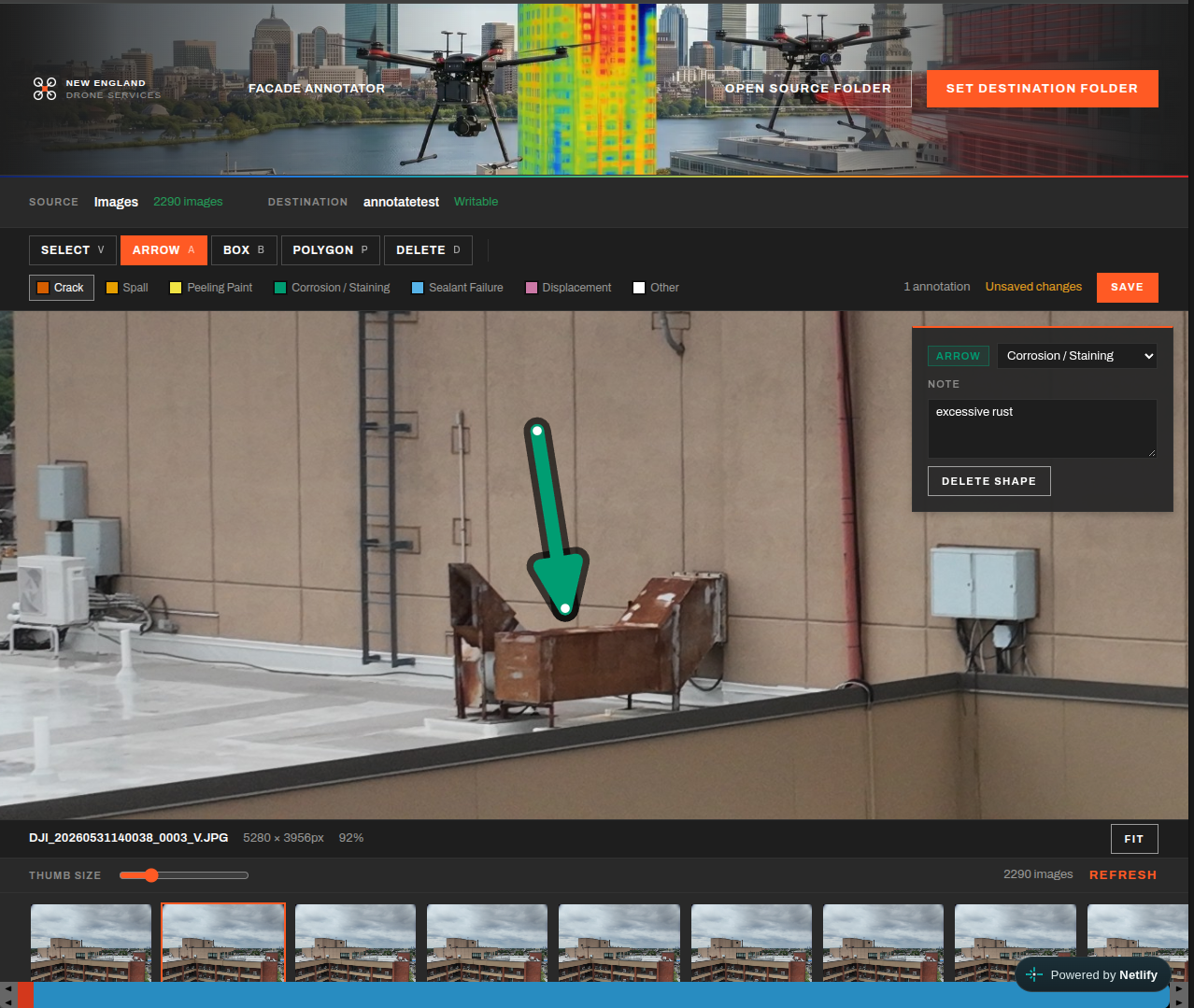
Arrows, boxes and polygons — the right shape for every finding.
Arrow
Drag from tail to headPoint straight at a specific spot — the tip of a crack, a rusted anchor, a failed sealant joint. Ideal when the defect is small and its exact location is what matters.
Box
Drag a rectangleFrame a defined area such as a spalled patch, a damaged panel or a stained lintel. The box records exactly which part of the image the defect covers.
Polygon
Click the corners, double-click to closeTrace irregular areas precisely — rust bloom, efflorescence, peeling coatings or a bulging section of masonry — so the marked region follows the real shape of the damage.
A note on every mark
Each shape carries its own written note — size, location, recommended action. Hover over any shape to read its defect type and note instantly.
Edit in place
Select a shape to move it, drag its handles to resize or reshape it, change its defect type, or delete it.
Full-resolution detail
Zoom and pan across the full drone image — 20+ megapixels — so hairline cracks and small sealant gaps can be marked accurately.
Every mark is classified — and color-coded to match.
Pick a defect type before you draw, or change it afterwards. Each type has its own color, chosen from a colorblind-safe palette and outlined so it stays visible on brick, glass, metal and sky alike.
Crack
Linear fractures in masonry, concrete, stucco or cladding.
Spall
Concrete or masonry broken away from the surface, often exposing reinforcement.
Peeling Paint
Coating delamination, blistering and flaking.
Corrosion / Staining
Rusting steel, lintels, railings and anchors, plus rust or efflorescence staining.
Sealant Failure
Cracked, debonded or missing joint sealant at windows, panels and expansion joints.
Displacement
Bulging, shifted or out-of-plane units, panels and copings.
Other
Anything else worth flagging — describe it in the note.
Your images never leave your computer.
Most online tools ask you to upload your photos to someone else's server. The Facade Annotator works the other way around: the tool comes to your images. It runs entirely inside your web browser, reading and saving files on your own machine.
No uploads, no accounts, no cloud storage — and nothing on our side that could ever expose one client's building to another.
Your folders, your machine
You choose a folder of images on your own computer and a folder for the results. The annotator reads from one and writes to the other — directly, through the browser.
Nothing is ever uploaded
There is no server behind the tool and no cloud storage. The website only delivers the annotator itself; your images and annotations never leave your computer.
No accounts, nothing shared
No logins and no shared database — so no other client can ever see your images, and your building's condition data stays entirely under your control.
From flight images to report-ready findings in a fraction of the time.
A single facade flight can produce thousands of images. The annotator is built to move through them quickly, so you spend your time judging defects — not wrestling with software.
Built for volume
Single-key shortcuts for every tool and defect type, a thumbnail strip that handles thousands of images, and one keystroke to save. Mark a defect in seconds and move to the next frame.
No more slide-deck markups
Skip the round trip of copying photos into PowerPoint or an image editor, drawing arrows by hand and tracking findings in a separate spreadsheet.
Nothing to install
Open the link in Google Chrome or Microsoft Edge and start working. Your folders are remembered for next time.
Every save produces two files, side by side.
Annotated images go straight into your inspection report, and the defect record keeps a complete, consistent log of every finding — ready to compile into a defect schedule for the Registered Professional or the owner.
Annotated image
A full-resolution PNG of each photo with every defect marked in its color — ready to drop straight into an inspection report.
Defect record
A structured file listing every defect on the image — its type, shape, exact pixel location and note — that can be compiled into a defect schedule or reopened and edited later.